
In Arlo's recent webinar, Langevin master trainer Dawn Lang showed how to design and deliver hybrid training, with some learners in the room and others online, so neither group feels like the afterthought.
Running an instructor-led session with half your learners in front of you and half on a screen is hard. You're managing two audiences, two sets of tools, and one clock. And as virtual training becomes more common, learner expectations keep rising.
Here, hybrid training means some learners are in the room and others join online, in the same session. It's different from blended learning, which mixes self-paced and live learning.
We teamed up with Langevin Learning Services, the world's largest train-the-trainer company, to show you exactly what great hybrid training looks like! Dawn Lang is one of Langevin's master trainers. She's worked as an educator, technology trainer, and instructional designer, and has delivered hybrid training as both a facilitator and a producer.
Langevin's saying is “never do for the learners what they can do for themselves,” so everyone got stuck in with polls and chat. Here's what stood out.
Hybrid learning models: know which one you're running
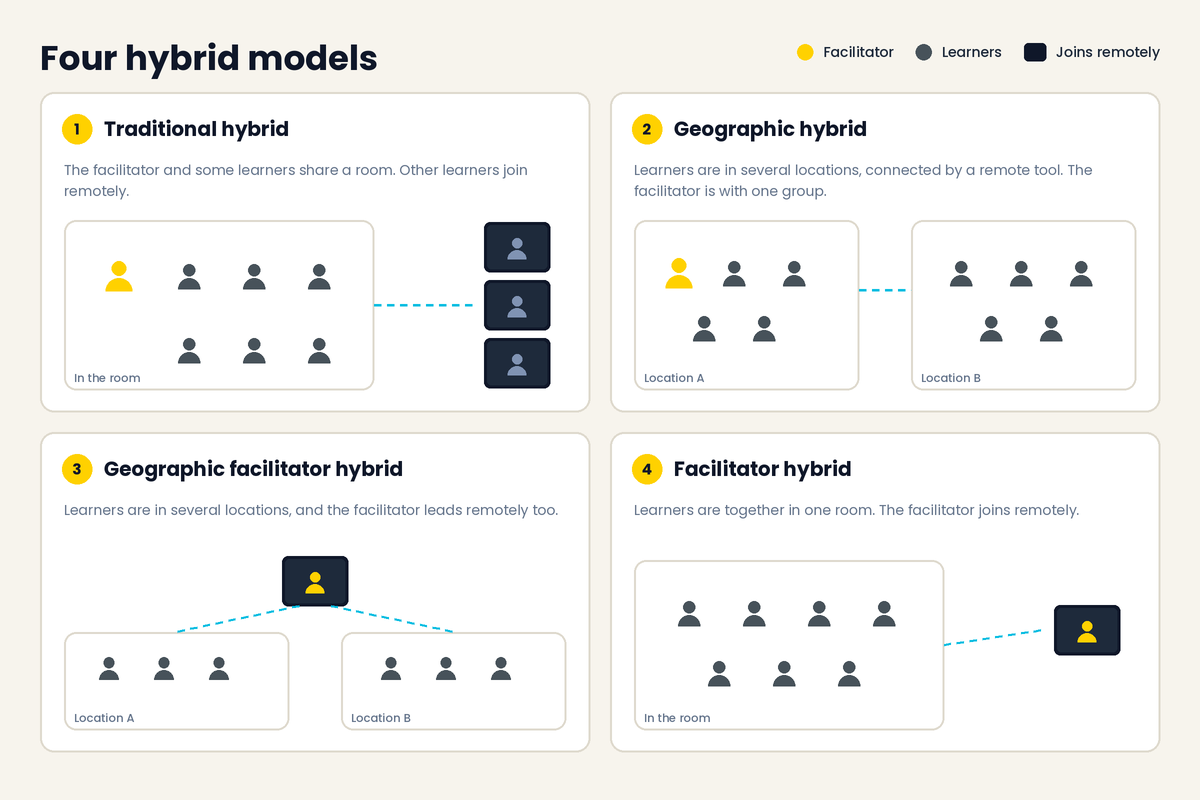
Dawn started with definitions, because “hybrid” covers four different hybrid learning models. They sit alongside the other types of virtual training:
- Traditional hybrid: the facilitator and some learners share a room. Other learners join remotely.
- Geographic hybrid: learners are in several locations, connected by a remote tool. The facilitator is with one of the groups.
- Geographic facilitator hybrid: learners are in several locations, and the facilitator leads remotely too.
- Facilitator hybrid: learners are together in one room, and the facilitator joins remotely.
The model you pick changes the equipment, the room setup, and what you need to watch during the session.
The virtual classroom producer and two other roles you need
Hybrid delivery also changes who needs to be on the team. Dawn described three support roles:
- Virtual classroom producer: logged into the remote platform, manages the tools, prepares files before they're shared, watches for technical issues, and sets up breakouts. Usually someone confident with the technology.
- In-class producer: in the room with the in-person learners, handles materials and technology such as handouts, whiteboards, and flip charts.
- Remote partner: takes on some of the facilitator's responsibilities without needing to be a full producer.
Not every provider can staff all three, and Dawn knows it. Many of her clients don't get the luxury of a producer, and she's clear about the cost:
“It changes everything because you just can't make it as interactive without slowing things down.” Dawn Lang
Her advice is to talk to stakeholders about what the budget buys and what it costs, then protect practice time. She's also used learners to help out:
“There's always people that will rise to that occasion.” Dawn Lang
That might be an in-person helper, or someone in the class who's comfortable with the technology. Dawn's own take on producers? “I wouldn't want to do without my producer.”
4 ways to improve hybrid training
Dawn built the rest of the session around four jobs: plan, design, prepare, and facilitate. Here's how each one helps.
1. Plan hybrid training around your constraints
Every hybrid project starts with data collection: what you're doing, who's involved, and how long you have.
“Constraints are those limitations on what we can do in our training.” Dawn Lang
She sorts them into four groups:
- Technical: virtual classroom software, microphones, headsets, and computers for staff and learners.
- Project: course length, class size, design time, the delivery team, and stakeholders.
- Design: how much experience the design team has.
- Learner: where learners are, their work experience, and their motivation.
Attendees voted on which constraints hit them hardest. Compatibility came first on the technical side, followed by getting good microphones and speakers. On the project side, budget and facilitator experience led. Even facilitators who've done face-to-face and virtual training are in for “a whole new ball game of trying to manage both pieces,” as Dawn put it.
Then she walked through five challenges that hybrid makes harder, and attendees shared what's worked for them:
- Time zones: learners in different zones shrink your available hours and may mean running the course more than once. Ideas from the chat: recordings, local trainers, self-directed activities, and shorter sessions. Check your organization's policy on acceptable training hours too.
- Internet access: connection speeds vary, and VPNs and security tools can slow people down. Run a pre-training tech check, provide transcripts for audio, and shorten the live time.
- Technology literacy: use a pre-assessment and step-by-step guides. Dawn's favorite fix is designing the first few minutes so your producer walks everyone through the key tools, then reminding people as you go.
- Equipment differences: if learners need a machine or tool they'd use on the job, talk to sponsors early. Share minimum equipment requirements, or offer a sandbox, virtual machines, or labs.
- Device differences: operating systems and installed features won't match. Pick a virtual classroom that works through an app or a browser and adapts to different screen sizes.
2. Choose methods, media, and tools that work for both groups
The design goal is simple to state:
“It won't matter whether they're in class or remote, it will be the same experience for everyone. And that's always our goal when we're doing hybrid training.” Dawn Lang
Dawn broke the choices into three layers.
Methods are the activities that let learners understand content and apply it. Demonstrations suit technical skills, behavior models and role plays suit interpersonal skills, and case studies suit analytical skills. When realistic practice isn't possible in a hybrid setting, a quiz tests knowledge instead.
Media is where the two audiences diverge most. Each type has its own hybrid problem:
- Audio: a remote facilitator can't easily hear small-group conversations in the room. Good microphones and speakers matter more than usual.
- Graphics: images that look fine on screen can be hard to see from the back of a room. Keep them simple.
- Text: in-person learners often use printed materials while remote learners use electronic copies. Keep them consistent so everyone is literally on the same page, and use bullet points instead of long paragraphs.
- Video: playback depends on each learner's connection. Pause a few extra seconds after a clip ends, and break a 90-second video into three 30-second ones. Dawn's favorite tip is to ask learners to react when the video finishes, “so you know that you're ready to start your discussion.”
Tools are the features built into your virtual classroom. Dawn quizzed the audience on the common ones, and attendees named them quickly: content sharing, chat, audio, screen sharing, polls, and whiteboard and annotation tools. Plan which ones you'll use for each activity, and make sure the in-room group gets the equivalent.
3. Get your hybrid classroom setup right
Next, Dawn moved to preparing the physical and virtual rooms. Attendees brainstormed their own lists first, and most of their ideas fit into the same categories.
“All the strategies are going to require a camera. But the positioning of that camera can make all the difference.” Dawn Lang
Her hybrid classroom setup checklist:
- Cameras: in a traditional hybrid, use a wide-angle camera for the whole room and a close-up camera for the facilitator. In a geographic hybrid, set up a camera at every location.
- Internet: you need high-speed internet in all four models. For facilitators and producers, a backup connection can be worth it.
- Computers and screens: every computer used in the session needs the virtual classroom software. In the training room, add a projector and screen or a TV.
- Speakers: geographic hybrids need speakers in several locations. Sometimes the built-in TV speakers are enough. It depends on the room, and you'll find out in a test run.
- Shared platform: learners need screen sharing and webcams, and ideally breakout rooms.
Walkthroughs and test runs came up again and again. Dawn then had attendees critique two sample setups. Her first catch? There was no camera on the facilitator.
4. Use hybrid facilitation techniques that include both groups
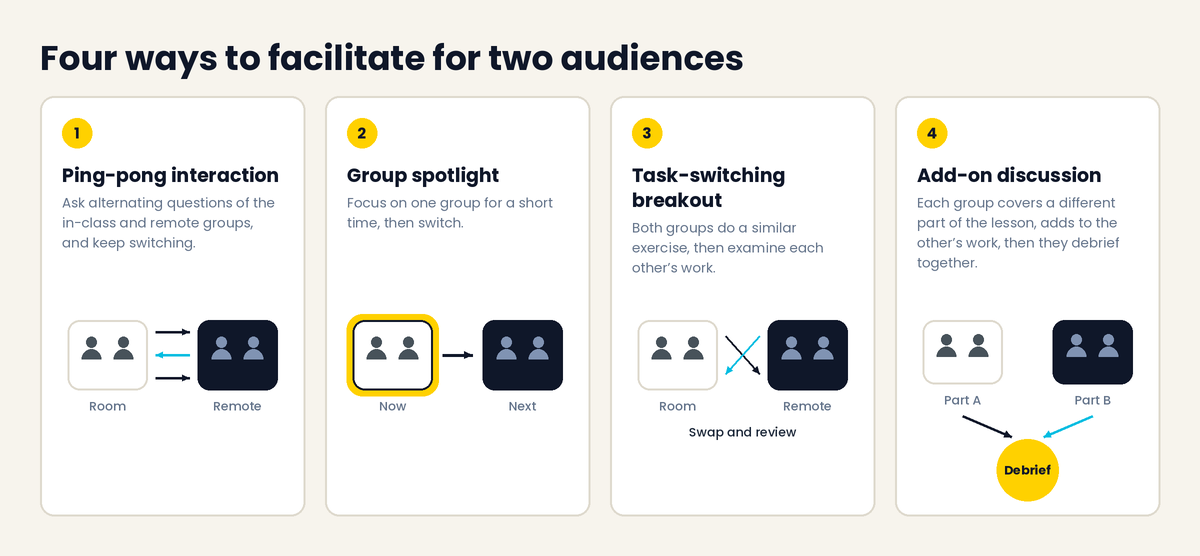
Dawn compared facilitating a hybrid session to juggling with one hand while balancing on a tightrope. People in the room want your guidance, people online are waiting for their moment to speak, and you have to keep both included. She shared four hybrid facilitation techniques:
- Ping-pong interaction: ask alternating questions of the in-class and remote groups, and keep switching. It was Dawn's favorite and the most popular choice among attendees.
- Group spotlight: focus on one group for a short time, then switch. This works well for discussions and builds a stronger sense of collaboration between the groups.
- Task-switching breakout: both groups do a similar exercise, with small differences based on logistics, then examine each other's work. It suits software training and other information-based courses.
- Add-on discussion: small groups each discuss a different part of a lesson, review each other's work and add to it, then debrief together. It takes longer, but engagement is thorough.
For more ideas to try with each group, see these virtual training activities.
Why bother?
“The real power of hybrid facilitation is inclusivity. It encourages participation, collaboration, and keeps everyone involved.” Dawn Lang
She also recommended a regular self-check, with one list of cues for the in-person group and one for remote learners. The goal is to spot patterns, catch blind spots, and adjust. Attendees picked what they expect to find hardest. Technology disruptions topped the list, along with watching for frustration from remote learners and noticing delays compared with the in-person group.
Small habits help. Dawn's examples:
“Pausing before you call on someone, or just getting in the habit of checking the chat before moving on can create a better experience for everyone.” Dawn Lang
More hybrid training answers from the Q&A
- Getting feedback on your own delivery: use a producer with a specific observation checklist, or give learners clear prompts for the feedback you want. Producers who also facilitate can spot friction that otherwise goes unnoticed.
- New ways to drive engagement: virtual classroom tools keep adding features, and other products can be integrated, from gamification to polls that look different from the built-in ones. Test any integration with your own software first. For more, see how to engage remote learners.
- Accessibility: use the same practices you already apply in face-to-face training, plus the tools in your virtual classroom, such as closed captioning and transcripts. Ask learners about their needs in advance. Dawn's summary: “Leave no one behind.”
What connects these four ways to improve hybrid training?
None of them is about adding a webcam to an in-person course. They're about designing for two audiences from the start: planning around constraints, matching media and tools, setting up the room, and facilitating on purpose. Hybrid works when neither group is treated as the add-on.
How Arlo helps you run hybrid training
Here's how an effective hybrid training session might look with Arlo! Most of the work happens before anyone joins, and that's where the platform helps.
You set up the course and its sessions with training course scheduling, so your in-person and live online dates sit in one place. Learners sign up and pay through course registration. Confirmations, joining links, and reminders go out from Arlo, so your producer isn't chasing people for a link or a tech check. That covers the pre-work, tech-check invitations, and joining details Dawn says make or break a session.
On the day, Arlo integrates with Zoom, so live online sessions run alongside your in-person courses on the same virtual training platform. Want learners to keep going afterward? Add follow-up content with Arlo's elearning and LMS, all in the same system.
The result is more of your team's time on the plan above, and less on admin. Want to know how a training management system can help you run instructor-led training, in the room and online? Check out our training management system guide.
If this session got you thinking about how you run hybrid delivery, book a quick call and we'll show you what other training providers are doing.
Take a Langevin workshop on hybrid training
Langevin runs two workshops that cover the skills from this session:
- Designing training for a hybrid workforce: three sessions, seven objectives.
- Facilitating training for a hybrid workforce: two sessions, six objectives.
Both include a reference manual with built-in templates, job aids such as worksheets and checklists, and plenty of practice in class. Dawn's promise: “We expect the participants to work harder than we do.” Find out more at langevin.com.