
Learning management systems are used across the training industry, by corporate L&D departments, universities, and independent training providers running course catalogues of their own.
The LMS market is projected to reach $31 billion in 2026, and a huge $104 billion by 2034, driven by a simple pressure: the World Economic Forum estimates that 44% of workplace skills will be disrupted within five years, and organizations need a scalable way to keep people trained.
This guide breaks down exactly what an LMS is, the different types available, who uses them, the features they offer, the role of AI in modern platforms, and the different pricing models you'll come across.
What is a Learning Management System, and how does one work?
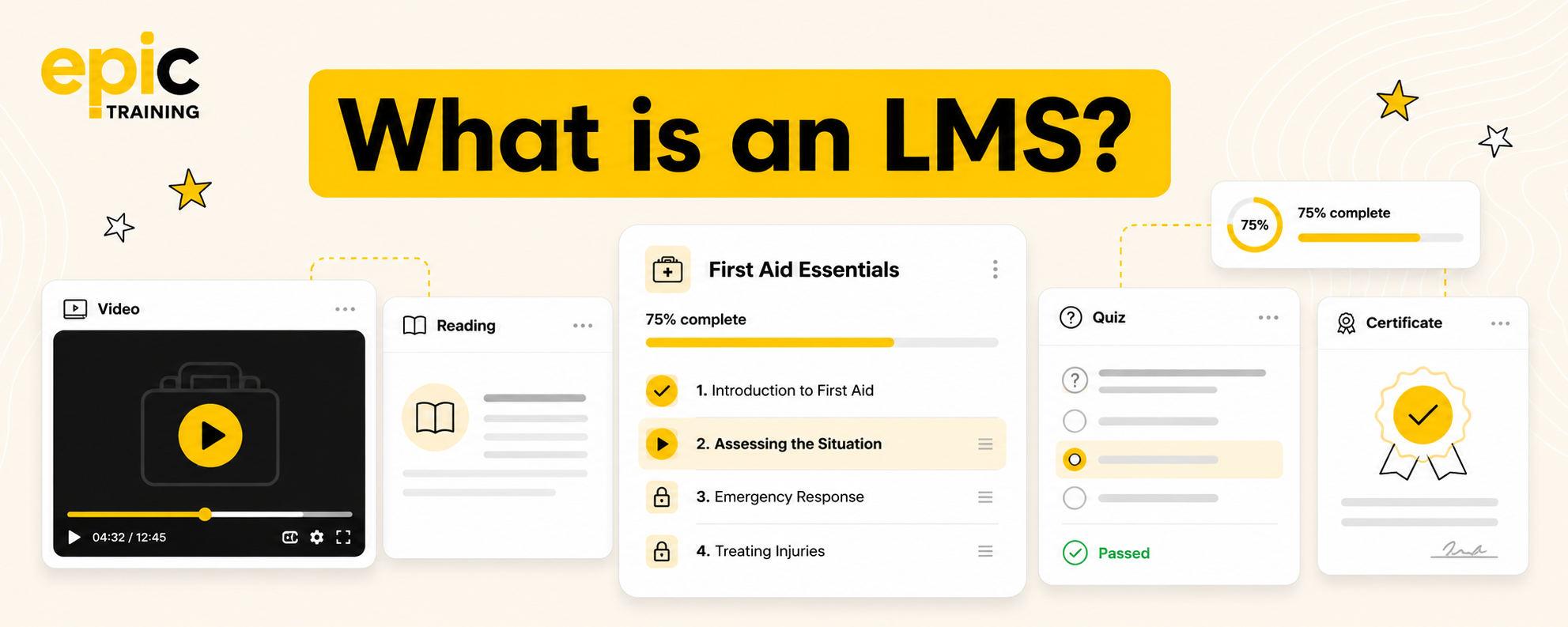
A learning management system, or LMS, is software used to create, deliver, and track educational courses.
LMS platforms have become the standard infrastructure behind online learning; they're used by nearly every higher education institution in the English-speaking world, and just as widely across corporate training, government, healthcare, and independent training providers.
At its center, an LMS handles:
- Administration - enrolling learners, assigning courses, and managing user roles and permissions
- Content delivery - hosting and serving course material, whether that's video, slides, interactive learning, SCORM packages, or live/instructor-led sessions
- Tracking and reporting - recording completions, quiz results, time spent, and pass/fail outcomes, then surfacing that data to admins and instructors.
All of the additional LMS features, such as gamification, mobile apps, AI-driven personalization, integrations with HR or CRM systems, sit on top of that same basic loop: create content, deliver it, and track progress.
What are the key types of Learning Management Systems?
LMS platforms generally fall into a few categories depending on how they are hosted, and audience type:
By deployment type
Cloud-based
Cloud-based LMSs are hosted by the vendor, and accessed through a browser, so an organization doesn’t need to manage servers or handle updates itself.
Self-hosted
A self-hosted LMS runs on an organization's own servers, they typically give more control over data and customization, but the organization needs to manage their own security, hosting and maintenance.
Open-source
An open source LMS is free to download and install, though hosting, set up, and ongoing maintenance are usually paid for separately, either in-house or through a third party.
By audience type
Platforms also differ by the audience they are intended for:
Corporate or enterprise
Corporate or enterprise LMSs are designed around employee training, onboarding, and compliance training.
Academic
Academic LMSs are built for course delivery, assignments and grading within a higher education or school environment.
Extended enterprise
Extended enterprise LMSs are designed to train people outside an organization's own workforce, such as customers or partners.
Industry-specific
Industry-specific LMSs are built around an individual industry's specific requirements, such as healthcare or finance, where regulatory and compliance regulations are more stringent than a typical corporate setting.
Who uses an LMS?
LMSs are common place across a wide variety of sectors, including:
Corporate L&D / employee training - organizations use an LMS to deliver onboarding, skills training, and ongoing professional development, and to track completion against internal training targets.
Higher education & schools - higher ed orgs such as universities, and schools use an LMS to host course materials, assignments, and grades for students across a semester or school year, often alongside a separate student information system.
Healthcare organizations - hospitals and care providers use an LMS to deliver and record mandatory clinical and safety training, since staff certifications often need to be renewed on a fixed schedule to remain valid.
Government agencies (compliance/regulatory training) - government agencies use an LMS to roll out regulatory and policy training across a large, often distributed workforce. Reporting is key for these organizations, so they can demonstrate compliance to oversight bodies.
Professional associations & membership orgs - associations use an LMS to deliver continuing education courses to members, track progress toward certification renewal, and sell courses to members and non-members.
Independent training providers - training providers often use an LMS to deliver the eLearning component of a blended course, but manage everything else - scheduling, registrations, payments, reporting - through manual processes, spreadsheets or disconnected tools. A training management system with built-in eLearning (like Arlo) covers everything in the same platform, so course administration, instructor-led training, blended learning, and elearning activities don't need to be managed across separate systems.
Nonprofits and charities - nonprofit organizations use an LMS to train staff and volunteers.
What are the key features inside an LMS?
Course creation & content
Authoring tools within an LMS let admins build courses. This means assembling slides, quizzes, images, video and text into a structured order that learners will move through, and then publishing the finished module into the course catalog. Courses may be singular or multiple modules.
Course management tools handle what happens to a course after publication. An admin can select multiple courses at once and duplicate, update, or archive them in bulk instead of opening each one individually, and every edit is recorded in a version history so a previous version can be restored if a change causes a problem.
Shared assets get uploaded once into a centralized library and can be linked to multiple courses, so updating that one file updates it everywhere it's used rather than requiring a separate edit in each course.
Learning paths can also be set, to chain individual courses into a fixed sequence for learners.
.png)
Learner experience
When a user logs in they typically see their assigned courses on the first screen after login, and can access them within a few clicks rather than searching. Most LMSs allow for a smooth user experience on mobile or desktop, so a learner can start a module for example, on desktop, and reopen it later on a mobile device at the same point.
Offline support extends this by downloading a course's content to a device while connected, tracking progress locally, and then syncing that progress back to the LMS once the device reconnects.
Many LMSs offer personalized or adaptive learning paths - determined by data already held on the user. For example, their role, a diagnostic quiz score, or a completed skills assessment to determine which course module they get served next, so two learners in the same program can be routed through different content based on what the system already knows about them.
Inside many courses, gamification elements will run a scoring system, alongside the course. So, when a learner completes a module, or passes a quiz the results are passed back to the learners profile. In many cases hitting a certain score will unlock a badge, and a leaderboard ranks learners, so an admin can get insights into how each learner is performing.
Some LMS platforms also contain social and collaborative learning tools, such as a discussion forum, a comment thread, or a live session link directly to the course or lesson, so learners can discuss the course content, post a question, or share an answer in the same place they are completing the material.
Course administration and delivery
An LMS admin uses enrollment management to assign learners to courses, either individually or in bulk. From there they can control what each user role can see and do once inside the system, and control what course content a learner can access, and when. An instructor, for example, might be able to upload content and view learner progress, while a learner can usually only access the courses assigned to them.
Many LMSs support multiple learning formats, such as blended learning, which is a mixture of elearning content and live sessions. This involves letting an admin attach a live session, such as a webinar or in-person class, to a course alongside its self-paced modules. A learner's dashboard then shows both a video to complete in their own time and a scheduled session to attend, and the system typically handles the calendar invite and records attendance for that session.
Automation generally runs on rules an admin sets up in advance. So, when a learner is enrolled, the system might automatically send a welcome message and assign the first course in a sequence, then follow up with a reminder if a deadline is approaching, without an admin having to manually track who still needs a nudge.
LMSs also offer localization and multi-language support, switching the interface text, and in some cases the course content itself, into a learner's selected language. So, a global workforce can often use a single platform rather than each region needing a separate system.
Analytics & reporting
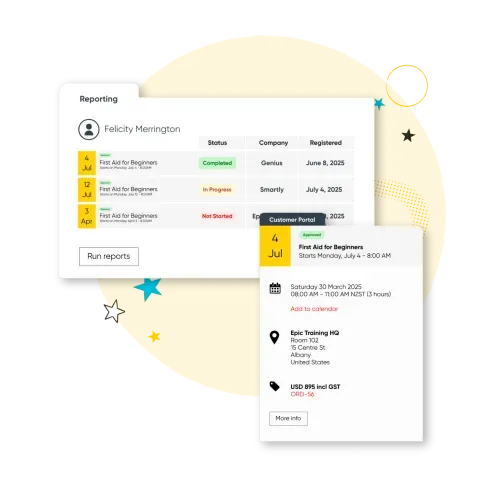
Most LMSs track progress automatically as a learner moves through a course, logging course completions, quiz scores, and pass/fail outcomes against that learner's profile without any manual data entry. Admins and managers can usually view this data through a dashboard, which pulls the raw activity logs into summaries, such as completion rates by team or department, so they don't need to review individual learner records one at a time.
Once course results are recorded LMSs generate reports that show who has and hasn't completed a required course by its deadline, along with a timestamped record of when each learner completed it. This creates an audit trail that can be produced if evidence is required that specific training took place.
AI is also being increasingly applied to the same underlying reporting data, using patterns in past completions and engagement to flag learners who are likely to fall behind, or to recommend a manager's next intervention before a deadline is missed, rather than only reporting on what has already happened.
Security & compliance
An LMS protects data primarily by encrypting it in two states: while it's stored on a server, and while it's moving between a learners device and the platform. So, if the data is intercepted in transit, or the storage itself is accessed without authorization, it can't be read without the separate encryption key.
On top of this, multi-factor authentication adds a second check beyond a password, usually a code sent to a learner's phone or generated by an authenticator app, so an account can't be accessed with a stolen password alone.
Many LMSs are also built to meet specific data privacy laws, such as GDPR in Europe, which governs how personal data can be stored, processed, and deleted on request. This typically shapes features like how long learner data is retained by default, and whether a learner can request their data be removed from the system entirely.
Integrations
Modern LMSs connect to other key platforms in an organization's tech stack through an API, so data can automatically pass between systems. A connection to a HRIS, for example, can pull in new starters as they’re added to the HR system and enrol them in onboarding courses automatically.
A CRM integration typically works in the other direction, pushing training data back out so, for example, a sales manager can see which reps have completed a product training course indirectly inside the CRM they use day to day.
LMSs will also connect to other platforms that facilitate learning. For example, video conferencing integrations let a live session, scheduled inside the LMS, generate a join link and add it to the learner's calendar automatically, so the instructor-led part of a course opens in the same tool learners are already used to for meetings.
For LMSs that sell courses directly, an e-commerce integration connects a payment gateway to the checkout process, so a learner can pay for a course and be enrolled automatically once the payment clears, without an admin manually granting access afterward.
AI
Modern LMS platforms apply AI across course creation, sequencing and reporting. Within course creation, AI content generation works by taking a prompt or a source document from an admin and producing quiz questions, course summaries, or a full lesson, including a complete course built from a single prompt
Ai also plays an important role in personalized learning, instead of an admin manually building a fixed path, the system analyses a learner's role, past performance, and skill gaps, then assembles a course order suited to that individual learner.
Other key AI use cases are identifying skills gaps and using predictive engagement signals. Skills-gap analytics compares a learner's assessment results and completed courses against a defined set of skills required for their role, then flags where a gap exists, so a manager can see which specific skills are missing across a team rather than only seeing a general completion percentage.
Predictive engagement signals work by monitoring patterns in a learner's activity, such as slowing login frequency or missed deadlines, and flagging that learner to a manager before a course is overdue, rather than only reporting on deadlines after they've already been missed.
.png)
What does a learning management system cost?
The cost of an LMS is largely driven by the size of your organization, the number of learners you have and the features required.
For example, a small organization delivering internal training may spend a few thousand dollars per year, while a multinational running training for thousands of team members could invest well into six figures.
Rather than charging a flat fee, most LMS vendors price their software using one or more of the following models:
- Per active learner
- Per registered user
- A fixed monthly or annual subscription
- Custom enterprise pricing.
As a rough guide, small organizations may spend anywhere from $1,000–$10,000 per year, while mid-sized organizations often invest $10,000–$50,000. Enterprise deployments can exceed $100,000 annually, particularly when implementation services, integrations and dedicated support are included.
Here’s an overview of some of the different pricing models you may come across and the pros and cons of each:
Per active learner pricing charges based on the number of learners who actively use the LMS during a billing period, for example anyone who logs in or completes training. Costs scale with actual usage and you're not paying for inactive accounts, which works well for seasonal or occasional training needs and makes it easier to forecast when learner numbers fluctuate. The trade-off is that costs can rise unexpectedly as adoption grows, and it requires ongoing monitoring of active users. This model is common among organizations with changing learner numbers, customer training programs, partner education, seasonal workforces, and organizations running occasional compliance training.
Per registered user pricing charges for every person with an account on the LMS, whether or not they actively use it. It's simple and predictable, which makes budgeting and forecasting easier, and it encourages broad access without worrying about usage limits. The downside is that it can get expensive if many users rarely log in, since you're still paying for dormant accounts. This model suits organizations with stable employee numbers, internal training programs, onboarding, and compliance-focused learning.
Tiered subscription plans offer packages with different feature sets, user limits, and support levels, typically split into basic, professional, and enterprise tiers. This makes it easy to compare options and gives smaller organizations a lower entry cost, with room to upgrade as requirements grow. The catch is that important features are often locked behind higher tiers, which can mean paying for capability you don't need or being forced to upgrade sooner than planned. It's a common fit for small organizations, growing companies, and organizations testing an LMS before committing to a larger deployment.
Fixed monthly or annual subscription pricing charges a set license fee for access to the LMS, usually with limits on users, features, or usage. Costs are predictable, procurement is simple, and financial planning is easier as a result. The downside is that it may not scale efficiently for very large user bases, can mean paying for unused capacity, and custom requirements often carry additional fees. This model tends to suit small-to-mid-sized organizations running internal learning, employee development, or standard training programs.
Custom enterprise pricing involves the vendor building a tailored package based on organization size, user numbers, integrations, security requirements, support needs, and implementation scope. It's designed around complex requirements and often includes dedicated support and services, making it better suited to large-scale deployments, with room to negotiate on features and price. The trade-offs are less transparent pricing, longer sales cycles, higher implementation costs, and the need for detailed evaluation to compare vendors properly. This approach is typical for large enterprises, multinational companies, universities, government entities, and organizations managing large external learning ecosystems.
Pay-per-course or transaction-based pricing charges based on individual course purchases, learner enrollments, or training transactions. It has a low upfront commitment and ties costs directly to revenue generated, which makes it useful for organizations selling training externally. The downside is that revenue can be unpredictable, it's less suited to internal learning programs, and costs can grow quickly if demand spikes. This model is most common among training providers, online academies, professional certification companies, and organizations monetizing educational content.
How an LMS fits into your wider training operation
When you’re evaluating an LMS it's important to look beyond the upfront license fee you’ll pay and consider how it fits into the wider cost running your training operation.
A lower-cost LMS may seem like good value, but if it doesn’t integrate well with the systems you already use, it can create additional administrative work. For example, you may need to transfer learner information between your LMS and CRM, manually update learner records, or pay for additional integrations to connect the systems you rely on.
There are a few things to look at when assessing how well an LMS will fit into your existing setup. Check which systems it integrates with out of the box, whether those integrations support two-way data syncing, and whether there are additional fees or technical work involved in setting them up.
For example, if you need to connect your LMS to a CRM, find out exactly what information can be transferred between the two systems and whether updates are synchronized automatically. If you need to connect it to other training or business systems, ask how those integrations work in practice and what happens when data changes in one system.
If you deliver a mix of online and instructor-led training, you may not need a separate LMS and training management system. Some training management systems now include built-in LMS functionality, allowing you to manage eLearning alongside your wider training operation.
Arlo is one example. Our training management platform covers the administration of training, including course scheduling, registrations, payments and reporting, while its built-in eLearning functionality allows providers to create and deliver online courses in the same platform. Arlo supports interactive content such as quizzes, assignments, videos and pre-reading, as well as SCORM import and delivery.
Arlo also supports blended learning, so providers can combine self-paced eLearning with live online or face-to-face sessions as part of the same course. For example, learners could complete an online module before attending a classroom session, then complete a quiz or further online activity afterwards. The course administration and learning activities can be managed together rather than across separate systems.
For training providers considering an LMS, this is another option to consider. If you only deliver self-paced online learning, a standalone LMS may be all you need. But if you deliver eLearning alongside face-to-face, live online or blended training, a TMS with built-in LMS functionality could allow you to manage more of your training operation in one place.
How to choose the right Learning Management System
This guide should have given you a good overview of what an LMS is, the types available, and a general idea on pricing.
As with most software purchases, there isn’t a single platform that’s best for all organizations. The right choice will depend on who you are training, the number of learners you support, the features you need, and how the platform fits into your existing tech stack.
Taking the time to understand your requirements up front will make it easier to narrow down your options and find an LMS that can support your organization now and as it grows.
Once you have a shortlist, compare the platforms against the features and integrations that matter most to you, rather than relying on the headline price alone.
Read reviews on software comparison sites, such as G2 or Capterra, to see what existing customers say about ease of use, support and reliability, and look at how each platform is rated for the features you need.
It’s also worth checking the pricing model carefully, including user limits, implementation costs, integrations and any features that are only available on higher-priced plans. Taking these factors together will give you a much clearer picture of which LMS is the right fit for your organization.

.svg)

.png)