.png)
There comes a point when the operational work behind private training starts becoming impossible to ignore.
Processes that once felt manageable suddenly feel overwhelming. Small coordination tasks start stacking up.
One day you realize your team is spending more time coordinating training than delivering it. You’re replying to client update emails all day. Checking learner progress across multiple systems. Forwarding trainer changes. Resending joining instructions. Updating spreadsheets just to keep everyone aligned.
You make it work, until making it work becomes the work.
If your private training operation still relies heavily on inboxes, spreadsheets, and manual coordination, these are some of the clearest signs your systems may no longer be scaling with your business.
Arlo’s new Organization Portal gives your private training clients a secure place to manage and view their training in one place without relying on your team for every update.
Here are seven ways it helps reduce admin, improve visibility, and make private training easier to scale.
1. Your clients can finally self-serve
Private training generates a surprising number of status-update emails. Clients want to know who’s registered, what’s coming up, whether learners completed training, where certificates are, how to book the next course… and the list goes on.
Back-and-forth communication feels manageable when volume is low. As demand grows, it becomes a bottleneck.
With Arlo’s Organization Portal now your clients can just log in.
The Organization Portal gives selected client contacts direct access to their upcoming and completed training, learner records, attendance, progress, certificates, and course details.
Less back-and-forth for your team. Faster answers for your clients.

2. Everyone works from the same information
Private training gets messy when information lives across inboxes, spreadsheets, calendar invites, and PDFs. When private training information is scattered, mistakes become more likely and friction creeps in.
The Organization Portal creates a shared view across your clients, admins, instructors, and learners.
- Your team manages training in Arlo.
- Clients can see updates in real time.
- Instructors have the delivery information they need.
- Learners still access their own records through the Customer Portal.
No more forwarding emails or manually compiling updates. No more disconnected systems. And no more data duplication errors.
3. Repeat private training becomes easier to grow
One of the biggest advantages of private training is repeat business.
A client runs leadership training for one team, then wants it rolled out company-wide. A compliance course needs refreshing every year. New starters need onboarding training every quarter.
The demand is often already there.
The problem is that repeat bookings usually start with long email threads, disconnected notes, and manual coordination.
“Can we run this course again in September?”
“Can we add another cohort?”
“Who attended last time?”
“Can we see the learner records first?”
When clients don’t have visibility into their training history, upcoming delivery, learner progress, or certificates, every new request starts from scratch.
That slows things down for both sides.
The Organization Portal makes repeat private training much easier to continue and expand because clients already have the context they need in front of them.
They can see:
- upcoming and completed training
- learner attendance and progress
- certificates and records
- past delivery history
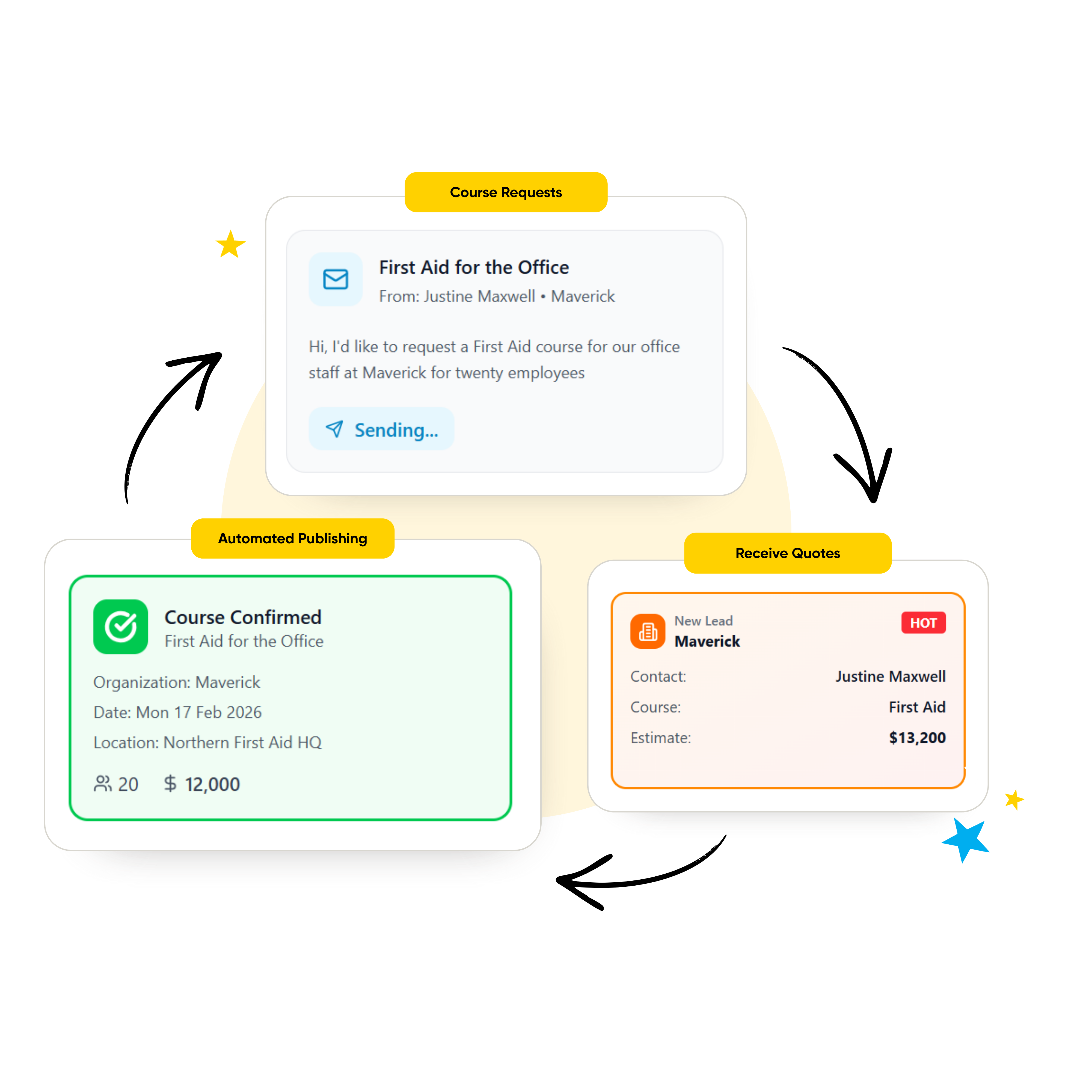
And when they’re ready to run more training, they can request it directly from inside the portal itself.Turn private training requests into a clear sales and delivery workflow. Clients can request additional private training from the Organization Portal through a secure form on your website. The request flows directly into the Leads tab in Arlo, where your team can follow up, send a proposal, confirm the booking, and create the private course. Once confirmed, the course automatically appears in the client’s Organization Portal with the details they need.
No chasing old email threads. No manually pulling reports together before every conversation. No relying on your team to surface information that already exists inside the platform.
The easier it is for clients to stay connected to their training activity, the easier it becomes to continue the relationship over time.
4. Your clients can manage training when it suits them
Private training coordination rarely happens neatly between 9 and 5.
A client remembers they need to add more learners after a long day of meetings. You need to check a learner’s certificate status before tomorrow morning’s training. A training manager finally gets time to organize next quarter’s delivery late at night.
Without self-service access, all of those moments turn into another email waiting in your team’s inbox the next morning.
“Can we still add two more learners?”
“Where do I find the certificates?”
“Can we run this course again next month?”
“Who completed the training?”
The Organization Portal gives clients direct access to manage and view their training whenever they need to. In different timezones. At midnight, if they like.
Even better, it’s mobile-friendly.
They can add registrants, check registrations, track learner progress, access certificates, manage attendees, and request additional training without waiting for someone from your team to respond first.
That creates a better experience for clients, but it also removes a huge amount of invisible coordination work behind the scenes.
Because the more private training grows, the harder it becomes when every update, request, or booking change depends on manual responses from your team.
5. Better visibility into learner outcomes
Training is not just about attendance. Trainers need visibility into outcomes: who completed the training, who passed, who still needs support, and whether learning is actually progressing across the workforce.
That’s especially important in compliance, onboarding, certification, and recurring workforce training, where learner records and progress need to stay visible long after the session finishes. Many organizations are also under growing pressure to prove training effectiveness and connect learning activity to real workforce outcomes.
But for many training organizations there’s a visibility gap. The Organization Portal gives business administrators a live view of registrations, learner progress, attendance, results, and certificate status across their private training in one place.
If they need more detail, they can drill directly into individual registrations to see additional learner information and progress updates.
And because the portal connects directly to Arlo, organizations can refresh and check for updates at any time instead of waiting for manual reports or status emails from your team.
That creates a much better experience for clients, but it also changes the role your team plays - less time manually compiling learner updates and more time helping organizations improve participation, completion, and training outcomes over time.
The easier it is for organizations to track progress, participation, certifications, and learning outcomes over time, the easier it becomes for them to continue investing confidently in training programs.
6. Your private training offering feels more professional
The strongest training businesses create brand consistency across every touchpoint.
Not just because it looks good, but because consistency builds trust.
When systems feel disconnected, clients notice. Different layouts, font, colours and logins. This often shows up when companies use branded websites paired with generic portals and manual spreadsheets behind the scenes.
It creates a gap between the quality of your training and the quality of the operational experience around it.
The Organization Portal helps close that gap.
Clients access private training through a secure, branded environment that feels like a natural extension of your business. Your logos, colours, fonts, and overall brand experience stay consistent across the wider training journey.
That consistency matters more than many providers realize because private training relationships are built on confidence: confidence in the delivery, confidence in the process, and confidence that your organization can support training professionally at scale.
The Organization Portal helps reinforce that experience by giving clients a cleaner, more connected, and more professional way to engage with your training business.
And because it’s built directly into Arlo, the experience stays connected across your website, communications, learner records, registrations, and training operations instead of feeling like separate systems stitched together behind the scenes.
7. It’s built directly into Arlo
As we just mentioned in the last point, the Organization Portal is built directly inside Arlo. Creating a better experience for your clients, and a better experience for your team. Once a private course is created in Arlo, the relevant details automatically appear in the Organization Portal.
You choose:
- which organizations have access
- which contacts can log in
- what they can manage and view
Access is organization-specific and controlled by your team. You decide which organizations and contacts can access the portal, and contacts only see information connected to their organization. When a contact is removed from an organization, their access to the portal is automatically revoked.
You can also switch between portals to see exactly what your clients see.
Everything in one place.
A better way to manage private training at scale.
.svg)