What is training management software?
What is a training management system?
A training management system (TMS) is purpose-built software that helps training providers to manage and grow their business from one central platform.
Rather than juggling spreadsheets, disconnected tools, and manually sending emails, a TMS brings everything you need into a single system. A TMS covers everything from course scheduling to payments, CRM, reporting, and more.
No more entering the same information across different platforms, no more lost emails, no more chasing customers for payment, and no more manual processes holding you back. Instead, your team gets hours of admin time back each week.
A TMS lets you automate daily operations, remove manual tasks, and focus on the parts of your business that matter most - delivering exceptional learning experiences and scaling your business.
It’s the backbone of any modern, successful training organization.
{{case-study-1}}
Key features of a TMS
What features are included in a training management solution?
Broad definitions aside, let’s get an idea what a pure, purpose-built training administration system for training providers might look like:
Back-office administration features (to make your employees’ lives easier)
- Organise course logistics and resources – schedule courses, presenters and rooms
- Automate manual tasks – send registration confirmations, reminder emails and surveys
- Manage finances – capture orders, accept payments online and issue invoices
- CRM and record management – store each customer’s upcoming and past training, financials, and sales interactions
- Reports and business intelligence – run reports to provide information to make data-driven business decisions
- Integrate with third-party tools - including marketing, finance and CRM, and specialist tools like Heropa virtual labs.
Front-of-house features (to make your customers’ lives easier)
- Website – build a website from scratch or integrate a TMS into an existing site
- Online registration and payments – accept online registrations and offer multiple instant payment options
- Customer portal – provide a self-service portal for registrants
- Automate communications - instant registration confirmation, course details, relevant links and reminders
Here’s a closer look at these key processes:
Course Creation
A TMS gives you the tools to set up instructor-led training, and in some cases blended and eLearning courses. This can be through arming you with a supply of course templates (to create and set up materials and resources for ILT and virtual courses) and an eLearning authoring tool or LMS integration for the creation and hosting of eLearning content.
Course Scheduling & Management
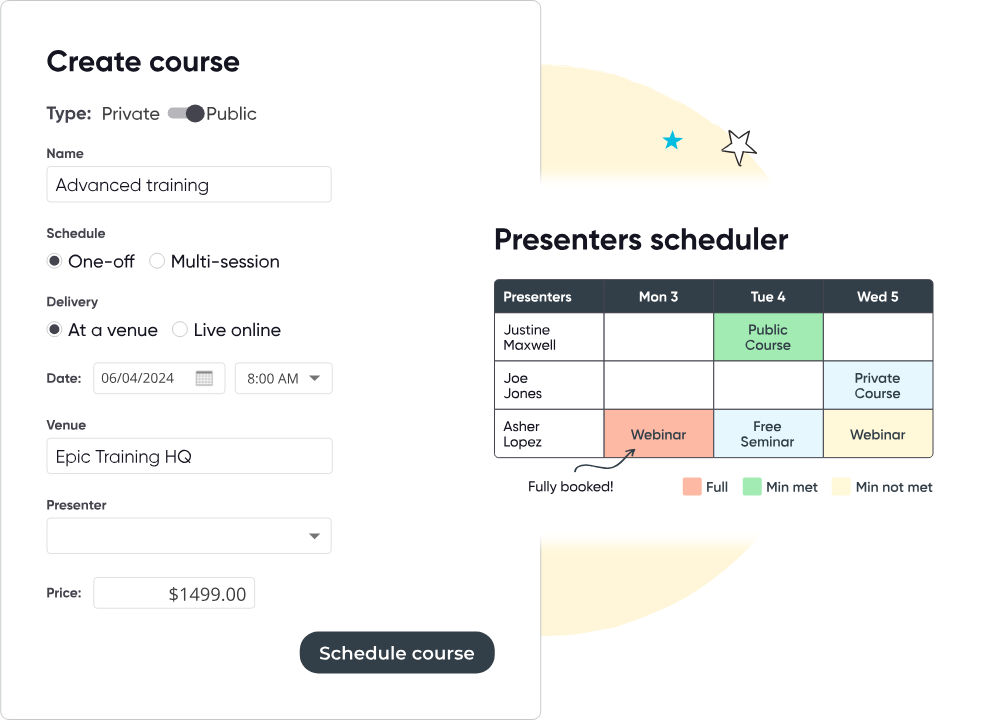
A TMS allows you to schedule courses, trainers, and resources in one place. You can view all upcoming sessions, assign instructors, and manage room availability or virtual meeting links without switching between multiple tools.
Participant Management
A TMS captures participant information through online registration forms and stores it in a centralized database. It tracks their attendance and progress by linking data to specific courses and sessions. Automated tools handle communication, sending email or SMS updates based on triggers like registration, upcoming sessions, or follow-ups.
Payment Tracking
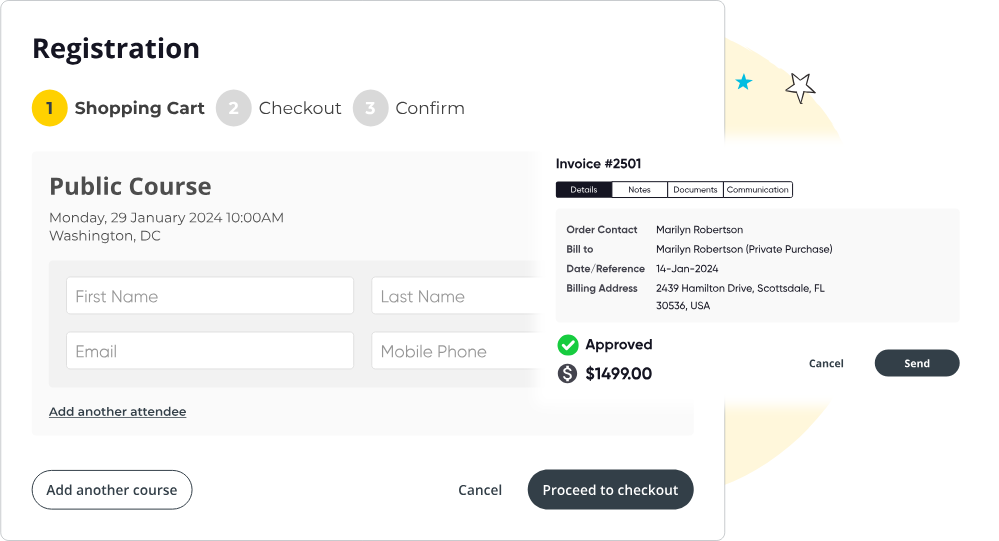
A TMS integrates payment processing with course registrations, linking each transaction to participant records. It generates invoices, processes payments through secure gateways, and updates financial reports in real time, allowing you to track income and outstanding balances with minimal effort.
Business Reporting
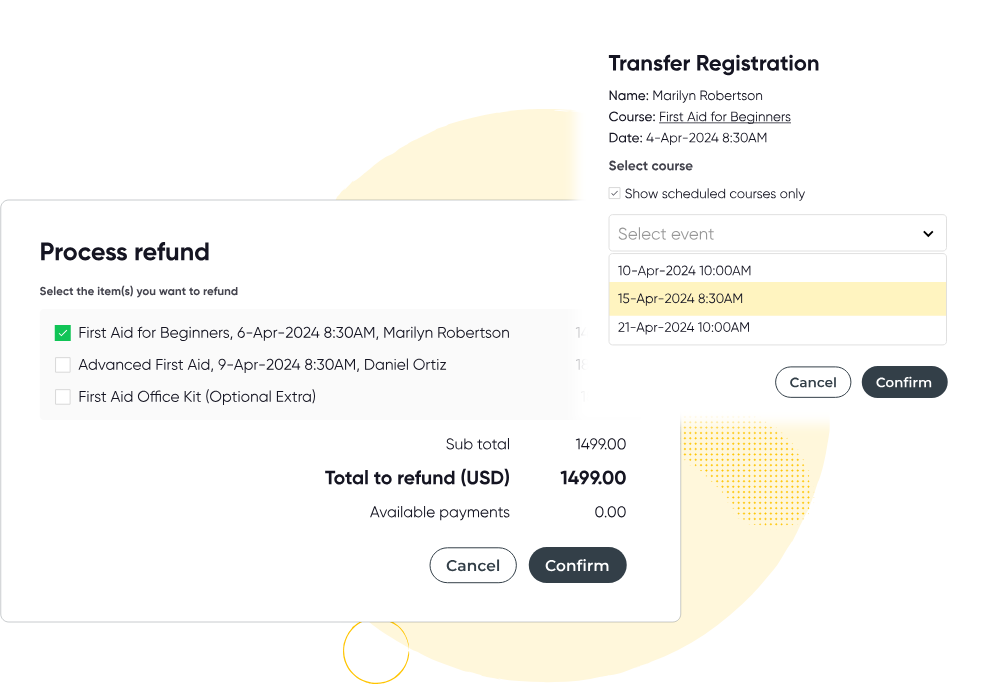
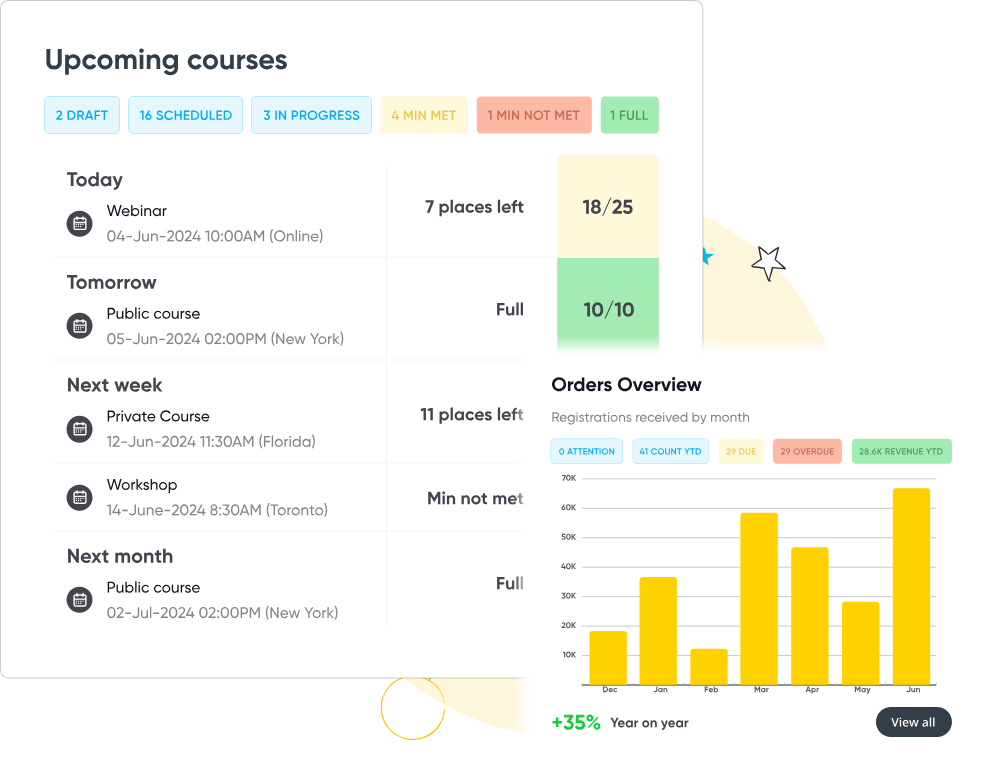
By collecting data from all operations, a TMS generates real-time, customizable reports on revenue, attendance, course performance, and trainer effectiveness. These insights are presented through dashboards or downloadable reports, helping you analyze trends and make data-driven decisions.
Marketing Tools & Integrations
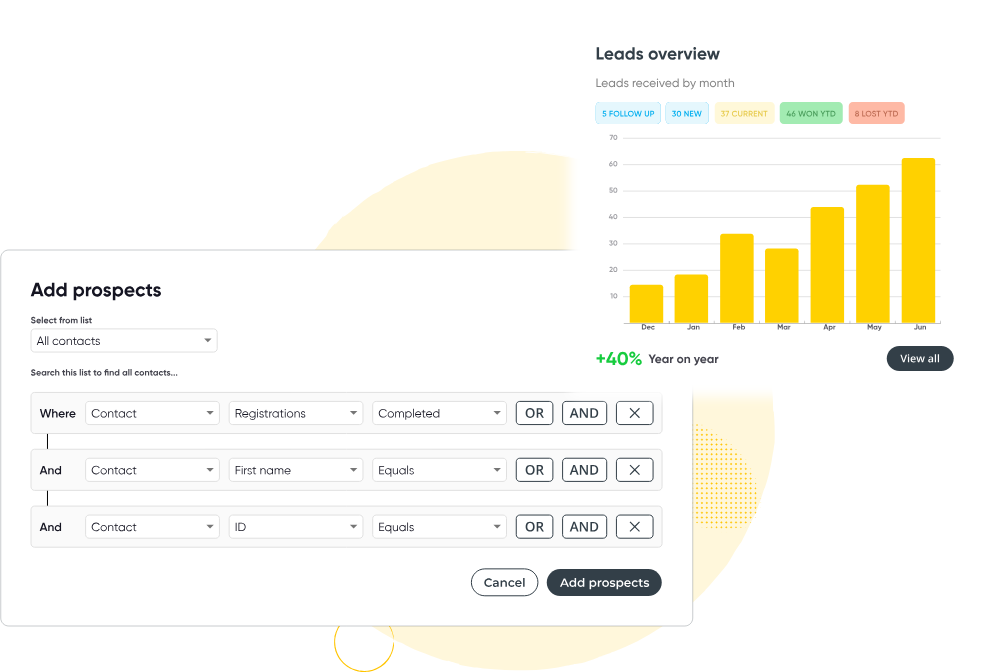
A TMS connects marketing tools to your training database, allowing you to design campaigns targeting specific audiences based on course history or preferences. It tracks campaign performance and automates tasks like sending promotional emails, improving outreach efficiency.
Website Integration
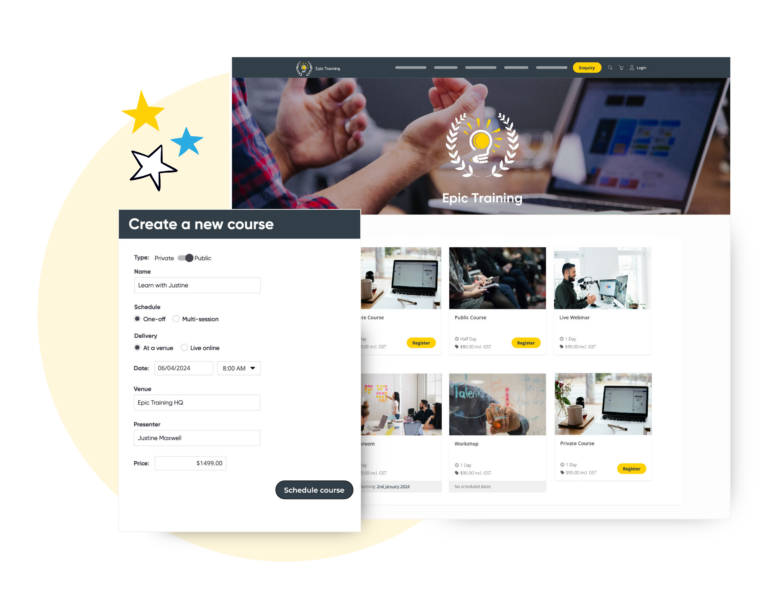
When we talk about website integration, we’re referring to the connection between your website and the solution you use to manage your training. In order to have an up-to-date website that drives users to checkout, this connection needs to allow data to flow seamlessly both ways, between the backend and frontend.
When looking to integrate your current website with a training management system you should look for a solution that allows you to:
- Provide up-to-date course information.
- Accept registrations and payments.
- Be mobile-friendly and functional across all devices.
- Offer a website that is intuitive to navigate around; visitors should be able to easily and quickly find the courses they are looking for.
- Automatically send course registrations and the contact details to your backend administrator platform.
- Utilise SEO so your pages stand out at the top of Google’s search results.
- Match your company’s brand appearance so there is a seamless blend into your current website and your visitors are unaware they are using another system.
- Offer your team the freedom and functionality to implement changes in real-time. You shouldn’t need to make changes within your CMS to update the course information on your website. Any changes you make in your Training Management System should be reflected automatically on your website’s frontend.
- eLearning Authoring and Delivery
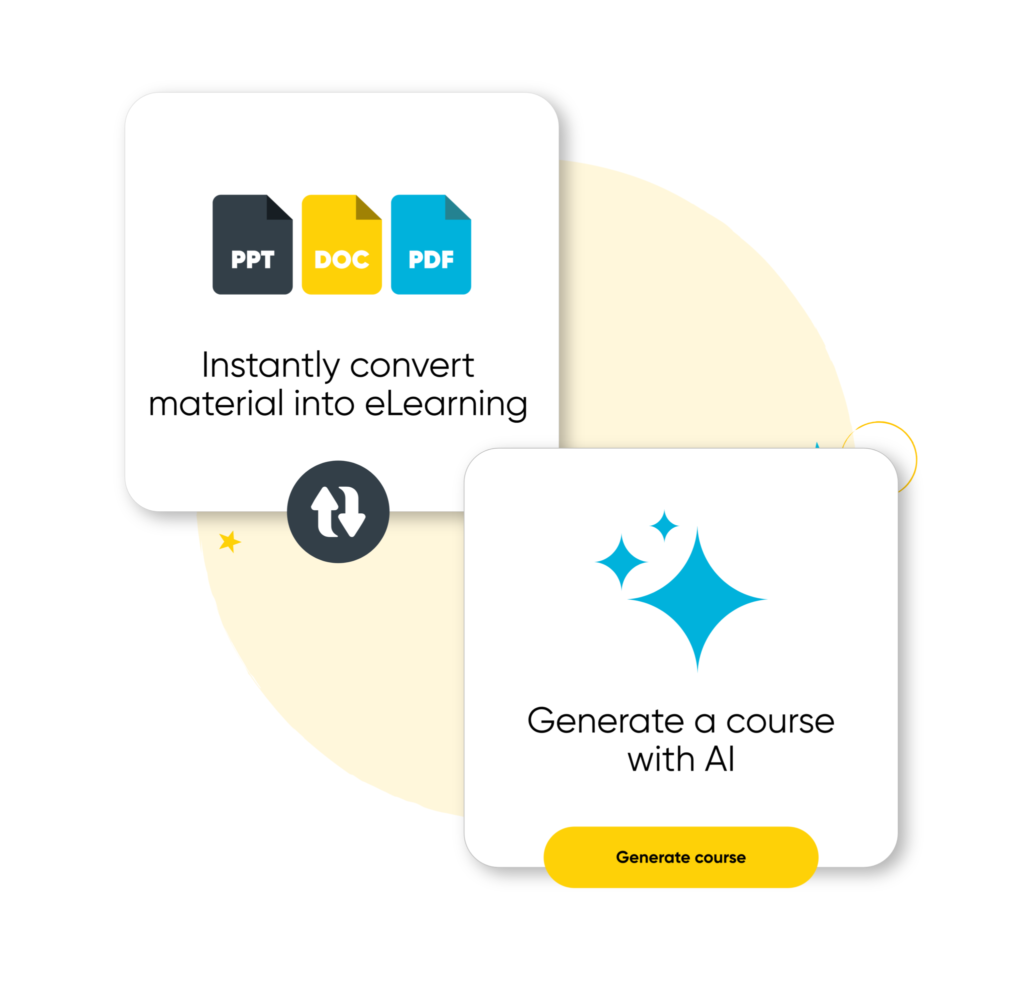
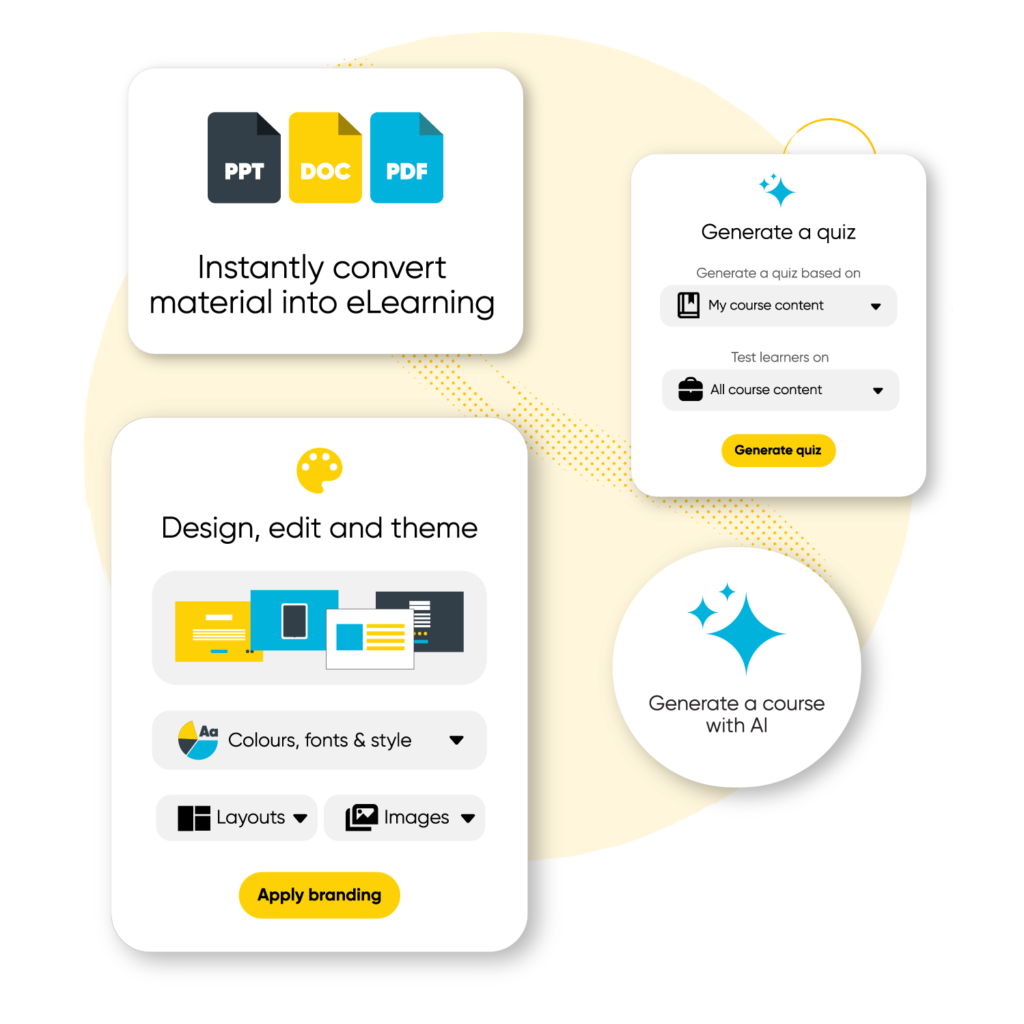
Some training management systems, like Arlo, offer eLearning authoring features that allow you to build and host interactive online courses.
Create engaging learning experiences with quizzes, videos, assignments, and other digital content. Use AI-powered tools to generate courses, transform existing materials, and customize content with flexible layouts and branding.
eLearning content can be delivered as standalone modules or integrated into blended learning programs, giving learners the flexibility to train at their own pace on any device.
Online Registration (aka checkout)
Your checkout page is crucial when trying to convert website visitors into paying customers. The more streamlined your online registration process is, the less opportunity there is for people to dropout early and abandon their cart. Your website has done the hard work by grabbing your users’ attention long enough to direct them to the checkout page; make sure you don’t fall short at the last hurdle.
To crush targets and see your sales soar chose a training management system that has the ability to take online payments, but also be flexible and offer options to:
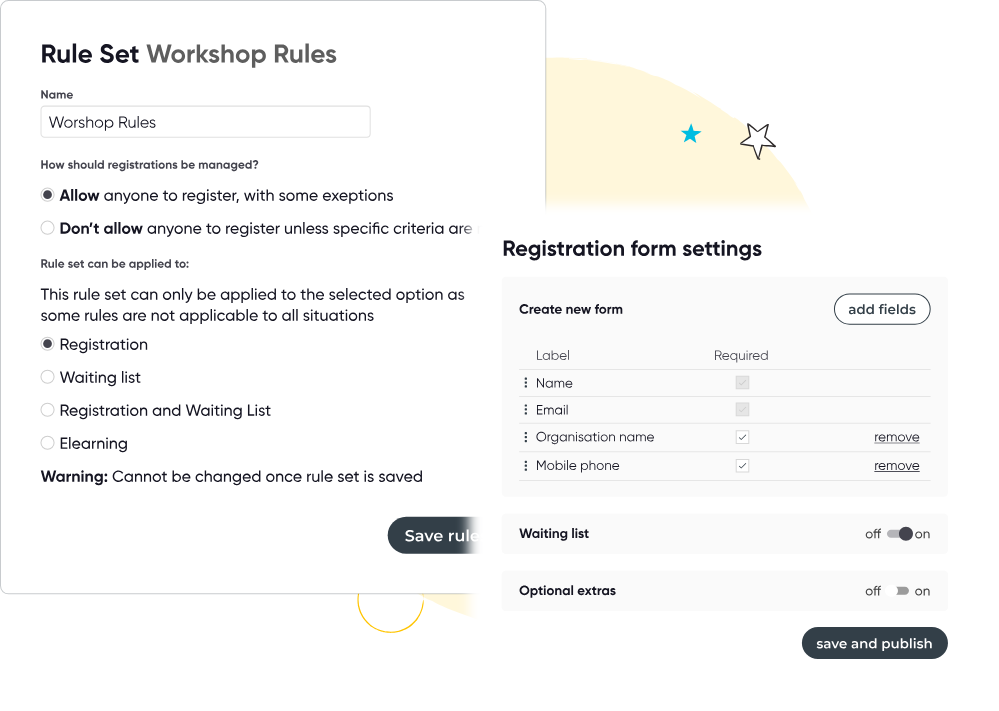
- Create registration forms with custom fields, so you can gather the registrant information you need to run your training business.
- Take payments via multiple methods such as credit card, invoice and bank transfer. It should also allow you to take partial payments by giving your users the option to pay a deposit and pay the rest in instalments.
- Have the flexibility to offer discounts, register for specific sessions and add optional extras such as books or catering. These improve registrant experience, but also give you some levers to increase your sales.
Think about your audience and their needs, and how they will interact with your checkout page, and then try to accommodate these scenarios. If you offer training courses to businesses’ customers, group bookings are important, so ensure your Training Management System gives you the ability to:
- Add multiple registrants to the same order — a business may choose to register a whole team under one order.
- Have an order contact that is different from the registrants’ details — customers may be registered to one of your courses by their manager. Being able to have a nominated order contact means that course information can go to the employee, whilst invoices can be sent to the manager.
- Have registration limits, such as maximum and minimum registration numbers, or the ability to limit registration to certain companies.
{{case-study-2}}
Now you know how a training management system works, and the key features these platforms contain, it’s time to take a closer look at exactly who uses training management software, and the industries that can benefit from using a TMS.
Who uses a training management system?
Roles
The people that get up close and personal with a TMS on a daily basis are generally training managers, administrators and the staff involved in selling and running instructor-led training, virtual training and eLeaning.
A TMS can cater to training organisations of all sizes, however, every training organisation has its own special needs. You may find that a TMS can slightly favour one type of audience over another; it’s up to you to identify your requirements so you know what boxes to tick.
At a high level, there are two main audiences for training administration software:
- Internal training – training people who do not pay to attend a course, for example upskilling your staff
- External, commercial training – training people who pay to attend a course
The key practical differences between these two audiences is that external, commercial training requires additional features that internal training operations may not need, such as:
- Financial – capture payments and integrate with your accounting system
- Website integration – an e-commerce website is usually your storefront
- Marketing tools – social media, email marketing, discounts
- Business analytics – understand costs, revenue, profitability and breakeven points of scheduled courses
- CRM – for your sales team
Industries
Arlo is used by a wide range of industry professionals. Including, but not limited to:
- CPD training providers. These educate professionals as part of a formal continuing education (CPD/CLE) program. Examples include the training of teachers, accountants, lawyers, engineers, builders, and health professionals
- Health and safety training providers. Arlo TMS helps first aid, NEBOSH, workplace safety, asbestos and fire safety training providers and more, all around the globe. Our software is constantly proving itself as a competitive advantage to their businesses with key features such as certification workflows to automatically issue certificates, as well as automatically remind clients when their certification or licence is about to expire and then create and track the renewal.
- Business and leadership training providers. The world’s leading business and leadership training companies are scaling faster, more efficiently by building their business on Arlo’s training management software. Task management, presenter scheduler and lead nurture tools are some of the top rated features by these customers.
- IT and software training providers. Arlo’s course templates, presenter and venue management, live online course management and website integration technology has enabled IT and software training providers like TMMi to streamline their course management processes and expand their software training business to new markets. Read their story.
- Real estate training providers. Arlo is used by industry-leading real estate training providers including Red, Moseley and ReConnect. Our software injects innovation, gives you a competitive advantage, and provides you with the tools you need to manage and grow your operation.
- Professional associations – Arlo is used by leading professional associations such as Alberta Construction Safety Association & Ottawa Construction Association
- And many more! Including universities, community education providers, not-for-profits, L&D teams, and other B2B training providers.
{{case-study-3}}
Why is Training Management Software so important?
Training operations around the globe are using systems that are not fit for purpose, and this leads to unnecessary work and wasted growth opportunities.
5 common problems that training providers face
1. Too much manual administration, at a high cost
Many training providers still rely on spreadsheets and manual processes to manage courses, registrations, presenters, and payments. While these systems may “work,” they come at a significant cost. Instructor-led training (ILT), whether in-person, virtual, or blended, is inherently resource-intensive, with countless administrative tasks required to deliver a smooth experience. Staff costs are typically the largest expense in any training operation. Every hour spent on repetitive admin work is an hour not spent improving programs, supporting learners, or growing the business. Manual administration doesn’t just slow teams down - it directly limits scale and profitability.
2. Disconnected systems create data silos and poor learner experiences
To cope, many training providers piece together a collection of generic tools: CRMs, event management platforms, website plugins, email marketing software, surveys, and spreadsheets. While each tool may do its job in isolation, these disconnected systems rarely work well together.
When data doesn’t flow seamlessly between platforms, training data becomes fragmented. The result is a disjointed back office and an inconsistent learner experience. For example, can your email marketing tool personalize campaigns based on course attendance, certification status, or accreditation level? If not, you may be sending generic, irrelevant messages that miss the mark, or worse, frustrate your audience.
3. Limited support for blended and online learning
As learner expectations evolve, many training providers struggle to support modern delivery models. Increasingly, training businesses need to offer blended learning, combining instructor-led training with self-paced online content. However, relying on separate systems for course management and online learning often creates even more complexity.
Modern training management systems now go beyond administration alone. Platforms like Arlo include in-built learning management system (LMS) capabilities, SCORM content hosting, and tools to manage both in-person and online learning in one place. Some, like Arlo, even support AI-powered content creation, helping training providers create, update, and scale learning content faster without adding more tools to the stack.
4. Learners expect a seamless registration experience
Consumers now expect a slick online experience for everything, from managing their online banking, to scanning personalized deals on Amazon. Consumers have become accustomed to interacting with online retailers that have intuitive websites, apps, and portals, and this sets the bar high for training companies.
Today’s learners expect a seamless online registration and payment experience. From browsing courses and registering online to making secure payments and managing their own bookings, expectations are higher than ever.
Many training organizations struggle to keep up. Clunky websites, manual invoicing, limited payment options, and poor self-service functionality make it harder to convert interest into registrations. Without strong e-commerce capabilities, even high-quality training programs can struggle to compete in a crowded market.
5. Lack of business intelligence and scalable growth tools
Finally, many training providers lack the reporting, insights, and optimization tools needed to grow efficiently. Without clear visibility into course performance, revenue, marketing effectiveness, and learner behavior, it’s difficult to make informed decisions.
On top of that, some training websites miss out on key SEO and conversion optimization features that drive traffic and registrations. Even when demand exists, limited payment processing, manual workflows, or poor system integration can prevent organizations from scaling their training business effectively.

From problem to solution: the benefits of a training management system
The world’s leading training organizations don’t grow by working harder - they grow by working smarter. They put a purpose-built training management system at the center of their operations and use it as the engine that powers efficiency, revenue, and scale.
When you adopt a modern TMS, you don’t just replace spreadsheets. You transform how your business operates.
Reclaim Time and Reduce Complexity
Automation replaces repetitive manual tasks. Data flows seamlessly instead of being copied and pasted. Processes that once took hours happen instantly. The result? Less operational friction and more time to focus on strategy, innovation, and delivery.
Turn Operations Into a Growth Engine
A purpose-built TMS doesn’t just manage training - it helps you scale your training business. With integrated marketing tools, streamlined online registration, optimized checkout experiences, and real-time reporting, your system actively helps you increase conversions and revenue.
Scale Without Increasing Overhead
Growth shouldn’t mean doubling your admin team. A scalable TMS allows you to expand course offerings, delivery formats, and geographic reach without paying more administrators. In fact, most Arlo customers find they reduce admin time by 40-80 hours per week - that’s two full time administrators! Whether you’re running dozens or thousands of sessions, your systems remain stable and efficient.
Deliver a Professional, Modern Experience for your learners
From branded course listings and self-service learner portals to automated communications and digital certificates, a TMS elevates your customer experience. Learners expect convenience and transparency, and a modern platform helps you deliver both at scale.
At its core, a purpose-built training management system gives you the freedom to focus on what truly matters: designing impactful learning experiences and growing a resilient, future-ready training business.
{{cta}}
How is Training Management Software different from…?
Learning Management System (LMS)
What is a learning management system (LMS)?
A learning management system (LMS) is a type of software dedicated to delivering online learning. Unlike a training management system, an LMS is mainly focused on the experience of the end-user. This type of system allows you to create and manage e-learning content, enrol and communicate with students, and track and assess their performance.
Learning management systems offer a range of features and functionalities to support the creation, delivery, and management of self-paced eLearning, with videos, quizzes, assessments and more. Some LMS will enable communication and collaboration between learners, instructors, and administrators. This can include chat, messaging, discussion forums, and email notifications.
Some will have mobile learning functionality, or even a mobile app, some will integrate seamlessly with other applications, and some will be highly customizable. They can also track progress and provide analytics on learner engagement and performance.
Can an LMS run my training business?
The short answer - no.
A learning management system is designed to manage and track online learning. It’s built for course delivery, learner progress tracking, assessments, and completion records.
What it doesn’t typically handle well (or at all) are the operational and commercial complexities of running a training business.
Most LMS platforms also lack robust eCommerce functionality, marketing tools, and the administrative workflows needed to run face-to-face or blended training at scale.
An LMS focuses on learning delivery. A training management system focuses on running the entire training business.
What If You Deliver Blended Learning?
If you deliver blended learning - combining instructor-led training with self-paced online components - things get more complex.
Traditionally, this meant integrating a TMS with a separate LMS. While integrations can work, they often introduce additional cost, technical setup, ongoing maintenance, and potential data silos.
Modern training management systems like Arlo eliminate this complexity.
With in-built eLearning functionality, SCORM hosting, and online course delivery tools, Arlo enables you to manage:
- Instructor-led training (in-person or virtual)
- Blended learning programs
- Self-paced online courses
- Course registrations, payments, and reporting
- all within one platform. Without integrations.
This means you don’t need to stitch together multiple systems just to deliver blended learning. Instead, your course management, learner data, financial reporting, and online content live in one centralized system.

So, do you need both an LMS and a TMS?
If you exclusively sell and deliver online-only courses, a standalone LMS may be sufficient.
But if you operate a commercial training business — especially one offering ILT, virtual classrooms, or blended learning — a purpose-built training management system with in-built eLearning capabilities provides a far more complete solution.
The goal isn’t to add more systems. It’s to reduce complexity.
And for modern training providers, that means choosing a platform that can support delivery, operations, and growth — all in one place.
Examples of LMSs: Moodle, Talent LMS, Open LMS, aNewSpring.
Event Management System (EMS)
What is an EMS?
Event management systems focus on one-off, ticketed events, such as conferences. From planning to post-production, an event management system can oversee the entire event lifecycle whilst also managing the mundane processes. It allows you to reduce administration by automating your registration, ticketing, seating maps and analytics.
But EMs just weren’t designed to help you schedule courses at scale, process complex orders and payments, manage waitlists and transfer bookings – to name just a few daily tasks. Additionally, EMSs focus mainly on the ticketing tasks in an event; this is not so good for growing repeat business through a loyal customer base.
Can an EMS run my training business?
Short answer – maybe.
On the surface, events and courses are similar in nature: they both require a venue booking, a smooth registration process, effective marketing and the ability to run reports and surveys. Dig a little deeper though and you’ll find they differ in a crucial way: event management tools focus on managing one-off events, whereas training providers regularly deliver the same courses, multiple times.
Why does this matter? Each course is treated as its own entity in an EMS, whereas a TMS treats them like a family. The benefit of having all your courses related to one another lies in the ability to share information and processes; this, in turn, reduces the amount of administration you need to do. Running a program of recurring training in an EMS doesn’t scale, therefore you wouldn’t be able to run multiple courses at an efficient rate.
Arlo’s course templates are a key feature for training companies running repeat courses. Course templates and presets automatically pre-fill course information information, making scheduling courses that re-run on multiple dates and locations easy. You can also import your events from a spreadsheet to schedule multiple courses in one action.
Most TMSs will be able to handle your recurring courses AND your one-off events. So why adopt both when you can kill two birds with one TMS shaped stone.
Examples: Cvent and Eventbrite.
Customer Relationship Management Software (CRM)
What is a CRM?
A CRM is a central system that stores every piece of information and interaction relating to your customers. Additional features include the ability to add notes, schedule follow-ups, deliver actionable insights and integrate with social media. A CRM is a great reference to help staff provide personalized customer service and close sales; it ensures the quantity of your database doesn’t affect the quality of your service.
Can a CRM run my training business?
Short answer — unlikely.
Think of a CRM as a big phonebook; its main purpose is to record customer data, purchase history and communications. A CRM doesn’t have the commercial tools you need to grow your business; nor does it have the functionality to simplify tasks involved in managing courses, presenters or accreditation.
Examples of CRMs: Salesforce and Microsoft Dynamics
{{case-study-4}}
Purchasing training management software
Checklist: Are you ready for a training management system?
- Are you sending out emails, generating invoices, updating your website, or reporting on your training operation manually?
- Have you got the same information sitting in multiple systems?
- Do you use spreadsheets to record registrations and course bookings, track attendance or tasks?
- When you change the time of an event, does your website automatically reflect that?
- Are you making avoidable, human-errors due to the amount of calculations or manual processes you need to do?
- Do all your systems talk to each other, or do you find yourself having to manually ensure they contain the same information?
- Are you stitching together systems such as an LMS and TMS to cover all bases of your business?
What to consider during the buying process
What features do you need?
- Integrate with your existing website, or if you don’t already have a website, does it have an easy to use website builder?
- Take online payments and offer flexible payment plans?
- Enable you to customise your registration and checkout process?
- Use an in-built CRM to keep track of all your customer interactions and business relationships?
- Cut the admin and automate tasks involved in managing the lifecycle of your courses?
- Proactively market to your audience and help you grow business leads?
- Gain both a day-to-day snapshot and a bird’s-eye view of your business via customisable reports and data dashboards?
- Have in-built elearning functionality, so you can replace clunky and expensive integrations with an LMS?
- Is the TMS compatible with all the systems in your current tech stack?
- Can your data flow both ways between your TMS and website?
- Would integrating with the TMS require manual data pushing or cleansing in order for your data to flow between systems?
- Does the TMS used a third-party system and are there hidden costs involved in running your data through this?
Understand Your Legal, Privacy, and Data Requirements
Training providers handle sensitive customer data every day — personal details, payment information, attendance records, certifications, and in many cases CPD or compliance data. Protecting that information isn’t optional. It’s a core business responsibility.
Before investing in a training management system, ensure it meets recognized security and compliance standards. Look for platforms that demonstrate a strong commitment to data protection — such as SOC 2 compliance, independent security audits, and clearly documented cloud computing practices.
It’s also important to consider data residency requirements. Depending on where you operate, you may need your customer data stored within a specific country or region. Some providers, like Arlo, offer region-specific data centers (including in the United States) to help organizations meet local regulatory and contractual requirements.
Security isn’t just about technology — it’s about trust. Your TMS should provide transparent policies, robust infrastructure, and ongoing investment in protecting your data.
With SOC 2 compliance, region-specific data hosting, and a strong commitment to cloud security best practices, Arlo is built to help training providers meet today’s highest privacy and compliance standards with confidence.

Choose a Platform That Evolves With Your Business
Your training business won’t stand still — and your software shouldn’t either.
Look for a vendor with a clear product roadmap and a track record of regular updates and improvements. Consistent releases signal ongoing investment in research, development, and innovation. Over time, that investment increases the value of your system and ensures it keeps pace with changing learner expectations, regulatory requirements, and industry trends.
Modern training management systems are expanding beyond administration to include integrated eLearning, automation, AI-powered tools, and deeper reporting capabilities. Choosing a forward-thinking platform helps future-proof your operations.
Check out Arlo’s product roadmap here.
Evaluate the Quality of Customer Support and Implementation
Implementing a TMS is a major operational shift — particularly if you’re migrating from spreadsheets or another system. Strong onboarding and responsive support can make the difference between a smooth transition and a frustrating one.
When evaluating vendors, ask:
- Is their support team knowledgeable and experienced in the training industry?
- What are their response times and service levels?
- Do they provide onboarding guidance and product training?
- Can they assist with data migration if needed?
- Are there clear, searchable support resources you can rely on during setup?
You’ll likely spend time in help documentation during the early stages, so it should be well-organized, easy to understand, and comprehensive.
A great TMS provider doesn’t just sell software — they partner with you to ensure long-term success.
Is it user-friendly and does it have good customer reviews?
Training management software should be easy to use. Of course, it can be difficult to assess whether a piece of software is easy to use before you use it, so check to see if the training management platform you’re looking at offers a free trial.
You may also want to assess their Help Center articles and customer support options to see if adequate help is on hand if you run into an issue with the platform. You should also be able to view previous customer experiences and reviews of the product to get first hand experience.
For example, with Arlo you can view our customers page to read more than twenty detailed case studies of the impact our training management system has provided different training organizations. You can also read over 80 reviews on our G2 page.

Do they have transparent pricing?
You shouldn’t have to jump through a million hoops to see what a training management platform will cost. On a training management system providers pricing page you should be able to see what the software costs and the features that are included with each package option.
For example, on our pricing page you can see a clear overview of what’s included in our ‘Professional’, and ‘Enterprise’ options, and a breakdown of how much each costs per the amount of administrator licenses you need, the amount of paid and free course registrations your training organization processes per year.
Make sure you get the right pricing plan for your business
It can be tempting to just go for the cheapest option when it comes to pricing plans but make sure you aren’t missing out on a feature that your business really needs.
Top tip: make sure you understand what plan the sales representative is showing you in demonstrations. Often salespeople will show you the system’s full capabilities without making it clear that it is not available on all plans.
Watch out for hidden costs:
- Processing fees – Vendors can add an extra percentage onto every transaction you make on their system to cover ‘processing’. This is not necessarily a bad thing but is often not clearly communicated in the buying process. It’s best to be up front before purchasing about how much the entire system will cost you to run.
- Registration costs as a percentage – Some vendors choose to clip the ticket as a percentage versus a simple one-off charge for every registration. Be wary of percentage-based registrations as this can easily blow up to be a large expense for you. Be clear on whether there is a maximum charge for this, for example, a vendor may charge 4% but limit this to $30 per registration.
- Implementation fees – Understand how much and how long you will need to budget for implementing the system before you purchase. Most systems have implementation options, some are mandatory, some optional, and all range in price. Make sure you factor this cost into your decision and weigh up whether the expense is worth the support you will receive.
- Hidden costs for extra features – If you are considering a vendor that has multiple plans, double check with the sales representative that the features you require are on the plan you are selecting. Some vendors charge extra fees for certain features. It’s always worth asking whether any of the features you need fall into this category.
- Consider the contract term – Some vendors will try to lock you into a multi-year contract at a discounted rate whilst others offer monthly plans. If you have commitment issues early on then start out in a month-on-month agreement whilst you continue your due diligence, then switch to an annual contract later when you’re happy with how the system has integrated into your business.
Compare and evaluate software solutions
Software review sites such as Capterra and G2 offer a comprehensive list of software solutions based on category, unbiased user reviews and head-to-head comparison. This is helpful to get a high-level understanding of what software solutions are available and how they are rated by other genuine users. What these comparison sites won’t do is give you a weighted rating of the best software for you, based on your own unique business requirements.






See Arlo for yourself
Schedule a personalized demo with our expert team and see how Arlo can automate all your training admin, so you can spend more time delivering great learning experiences.
Book a Demo