Course Registration

Course registration software

Streamline your public & private registration workflow across any format with flexible forms, automated invoicing and a self-service portal for learners.


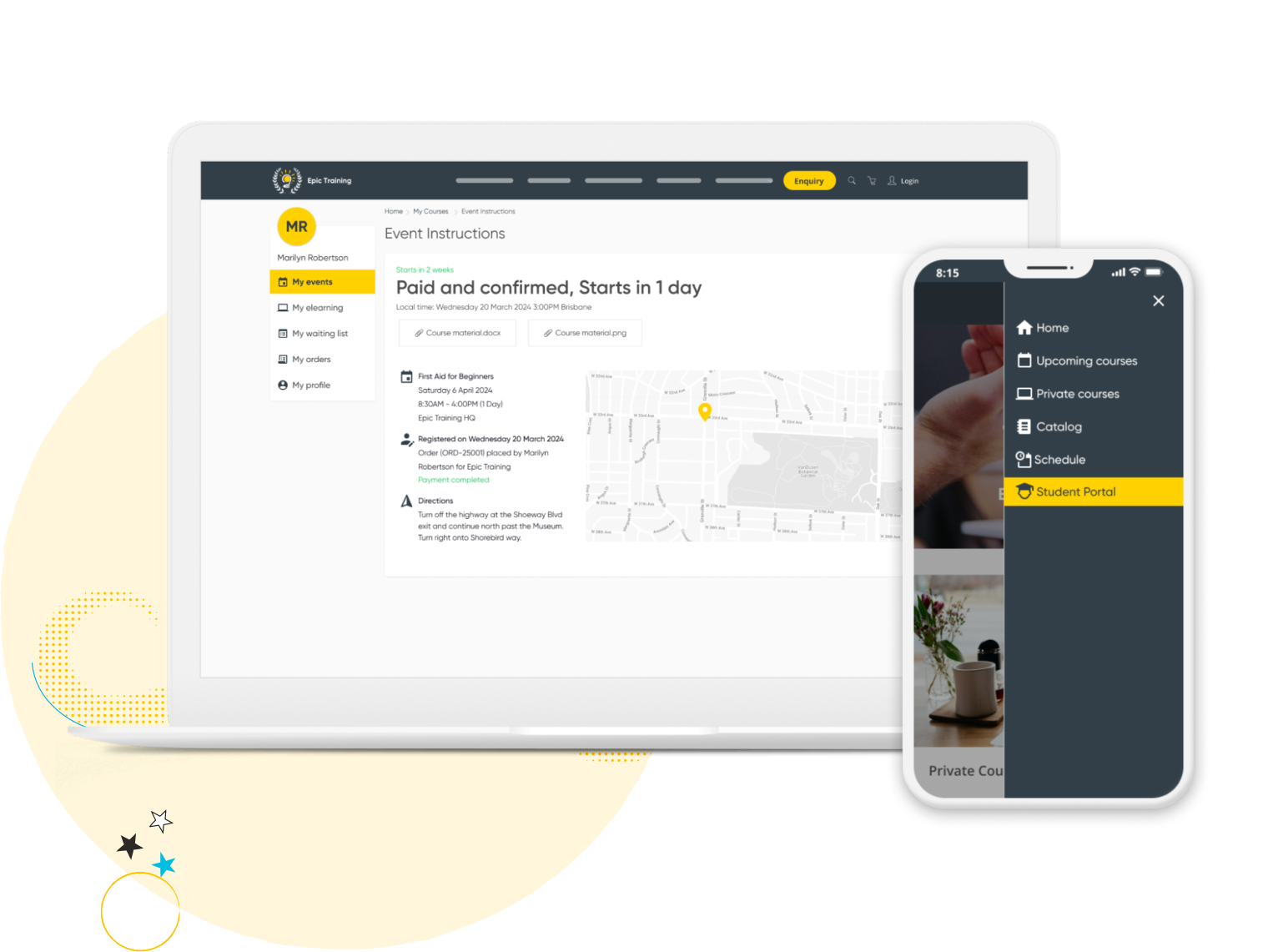
Tablet screen showing event instructions for paid course 'First Aid for Beginners' with date, location map, and registration details.

What is course registration software?

Course registration software manages the full enrollment cycle for training providers. Registration forms, payment collection, invoicing, waitlists, and confirmations - all in one system instead of stitching together a form builder, payment tools, and spreadsheets.

Arlo's course registration software is built specifically for instructor-led and blended training providers. Online registration forms sync directly to CRM records, payments connect to invoicing and your accounting system (Xero, QuickBooks and more), and every registration, transfer, and cancellation updates automatically across public, private, multi-session, and multi-location course delivery.
Curved yellow line looping with white and black stars around the loop on a black background.

Course registration software vs. general event registration tools

General event ticketing tools handle a single sign-up form and a payment. That's where they stop.Training providers need more: recurring class schedules, waitlists and transfers, CPD or CE tracking tied to attendance, and registration data that flows into a CRM instead of sitting in a standalone tool.

Arlo is built for that workflow, not adapted from one built for concerts or meetups.You shouldn't have to shoehorn your training business into a tool that wasn't built to manage repeat course workflows. And now you don’t have to.
Curved yellow line looping with white and black stars around the loop on a black background.

Registration forms made for training

Create professional registration forms that convert. Utilize templates or create one-off forms that are easy to set up, highly customizable and support public and private workflows.
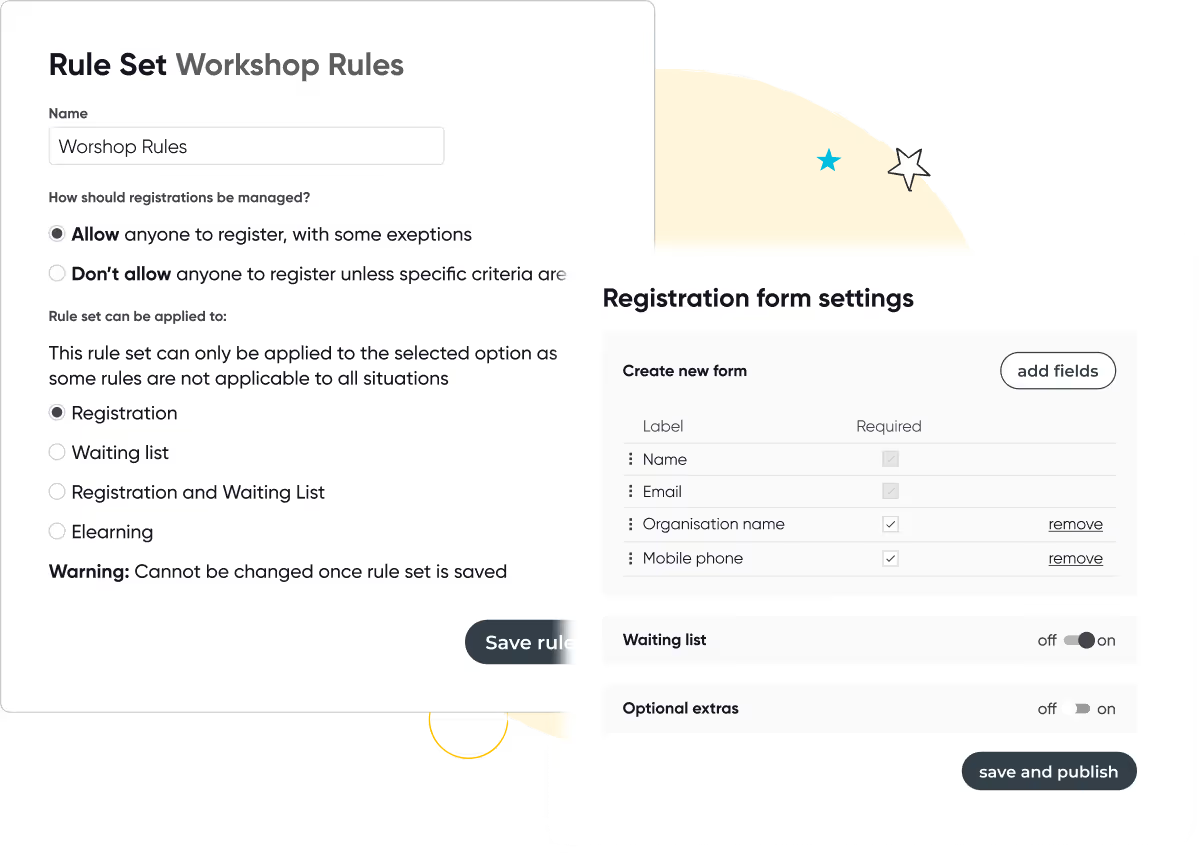
  • Automatically adds a new customer record or syncs existing data in Arlo
  • Allow for multiple registrants and multiple courses per order
  • Create rules for screening, wait lists and registration limits
  • Flexibility to add discounts, additional courses, merchandise and more

Screens showing workshop registration rules with options for managing registrations and rule applicability, and registration form settings with fields and toggles for waiting list and optional extras.
Curved yellow line looping with white and black stars around the loop on a black background.
Online registration checkout page showing payment details for order #2501, with credit card selected as payment method, subtotal $1349, tax $150, total $1499, and invoice details for Marilyn Robertson including billing address and approval status.

Effortless payments and invoicing

Manage the entire payment process with ease. Automatically create and send invoices, track payments, and add checkout options such as partial payments, discounts and vouchers

  • Take payments via Stripe, PayPal, Windcave and more
  • View and manage historical, paid and unpaid orders
  • Offer flexible payment options such as credit card, invoice and bank transfer
  • Connect with your accounting system of choice, with QuickBooks or Xero integrations
Yellow swirling line with two white star shapes on a transparent background.

Manage transfers, cancellations & refunds

Arlo manages all aspects of transfers, refunds, and cancellations for you. Built-in tools allow you to easily cancel or transfer registrations and automatically notify your customers of any changes.
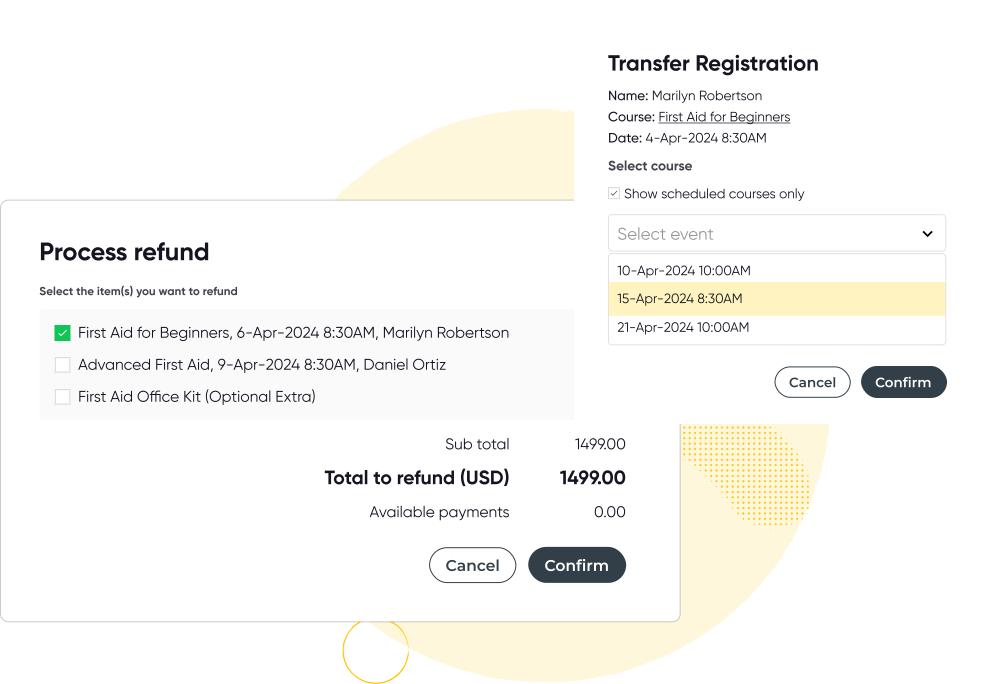
  • Update orders and invoices and process refunds
  • Instant email notifications sent to customers when a change is made
  • Enable registrants to self-serve cancellations or transfers

Curved yellow line looping with white and black stars around the loop on a black background.
Laptop showing event instructions for a training course with map and details, next to a smartphone displaying a sidebar menu with options including Student Portal highlighted.

Self-service customer portal

Create a branded customer portal that saves you time and empowers your learners with self-service. Customers can quickly register for courses, view upcoming and past training, manage their profile, and more.

  • Add your company colors, logo and more to match your brand
  • Registrants can access course instructions, certificates and professional development points (CPD/CLE)
  • Allow customers to transfer or cancel their own bookings
Curved yellow line looping with white and black stars around the loop on a black background.

Communispond reduced manual processes by 80%

Communispond, a global communication skills training provider based in Fort Lauderdale, Communispond runs global communication skills training out of Fort Lauderdale, Florida. Registration and payments used to mean manual work at every sign-up. Now it's automatic.

They switched to Arlo and haven’t looked back. Registration, payments and confirmations all run automatically, cutting admin by 80%, and giving customers a faster, more secure sign-up experience.

"Arlo has enabled us to reduce the manual tasks for running our open enrollment programs by 80%." - Scott D'Amico, President, Communispond

Ready to streamline the registration experience?

No credit card required. Unlimited users.

Thanks, we will get back to you shortly.
Oops! Something went wrong while submitting the form.

Course Registration Software FAQs

 Start your free trial
Can I transfer a registration to a different course date or session?
Grey Dropdown Icon

Yes. Arlo allows you to easily manage registration transfers across your course offerings, whether to another date, session, or even a different course template.

Automated emails notify both the original and new registrants, helping you keep interested participants informed seamlessly.

If you’re using our customer portal features, your customers can self-service their transfers and cancellations themselves if you enable it.

Can I swap one registrant for another?
Grey Dropdown Icon

Yes. At a course level you can remove a participant and a new participant on behalf of a learner.

Does Arlo offer integrated payment processing?
Grey Dropdown Icon

Yes. Our platform supports integrated payment processing providers available from you to select from with our preferred partner being Stripe, your customers can also pay with Google Pay, Apple Pay, Afterpay (Clearpay in the UK), Klarna if you enable them in your checkout settings.

Can I process refunds or additional charges when transferring a registration?
Grey Dropdown Icon

Arlo has a built-in invoicing system that enables you to manage refunds, credits, or additional charges efficiently, supporting a smooth registration process for both you and your participants. Connect Arlo with your accounting system (e.g Xero, QuickBooks) for accurate billing and accounting data across both systems.

Can I customize the registration form for specific courses?
Grey Dropdown Icon

Yes. Customizable registration forms enable you to tailor a registration form to ensure you capture relevant data from interested participants. You can apply these at platform, template, or individual course levels.

How do I find or report on registrations?
Grey Dropdown Icon

You can get a quick overview of new registrations from your dashboard, dive deeper with standard or custom reports, or view data at the individual course level. You can also click into any registration to see detailed activity, including attendance, payment status, and more.

Does Arlo automate registration-related communications?
Grey Dropdown Icon

Yes. Automated emails are sent for confirmations, reminders, cancellations, and follow-ups. You can organize, and set up all of these emails within Arlo.

Can I export registration data?
Grey Dropdown Icon

Yes. Export registration details—including contact info, attendance tracking, payment records, and custom fields—for individual or multiple courses to support your reporting and compliance needs.

How much does course registration software cost?
Grey Dropdown Icon

Arlo's course registration software is included as part of the full platform, not sold as a standalone add-on. Pricing depends on your course volume and the features you need. See pricing for a plan comparison, or book a demo for a quote based on your business.

Can I manage registrations, payments and CRM data in one platform?
Grey Dropdown Icon

Yes. Every registration in Arlo automatically syncs to CRM records, connects to payment and invoicing, and updates reporting in real time. You don't need separate tools for forms, payments and customer data.

How is course registration software different from a general event registration tool like Eventbrite?
Grey Dropdown Icon

General event tools are built for one-off ticketed events. Arlo is built for training providers running recurring courses, waitlists, multi-location delivery and CPD/CE tracking, with registration data flowing directly into a CRM rather than sitting in a standalone system.

Can I manage waitlists and registration limits across multiple locations?
Grey Dropdown Icon

Yes. You can set registration limits, waitlists and screening rules per course, and manage them consistently whether you're running one location or several.

Does course registration software support CPD, CEU or certification tracking?
Grey Dropdown Icon

Yes. Registrants can access certificates and CPD/CLE points through the self-service portal, and completions tie back to your certification and licensing records in Arlo.

Training Management System

Ultimate guide to training management systems

Compare the best training management systems for 2026. See features, pricing, and top tools for training providers.

Read the guide

Let’s chat registrations & payments

Our mission is to empower the delivery of great learning. Get in touch with us today and learn how we can help your business get more time back and streamline your admin processes.

Talk to our expert team

Group of six smiling diverse adults with a yellow circle reading arlo and cartoon stars in background.